框架服务
本节介绍可供视图使用的框架服务。
ViewContext
视图服务端资源可以访问 ViewContext 对象。视图上下文提供当前已认证用户、视图定义、实例配置属性、实例数据和视图控制器的信息。
/**
   * The view context.

   */
  @Inject
  ViewContext context;
实例数据
视图框架提供了存储键值对“实例数据”的方式。数据限定在指定的视图实例和用户范围内,可用于“用户偏好”等信息或支持视图应用体验的其他轻量级信息。可以通过 ViewContext 对象访问实例数据的 get 和 put 方法。
有关实例数据 API 的用法,请参阅 Favorite View 示例。
https://github.com/apache/ambari/tree/trunk/ambari-views/examples/favorite-view
/**
 * Context object available to the view components to provide access to
 * the view and instance attributes as well as run time information about
 * the current execution context.

 */
public interface ViewContext {

 /**
   * Save an instance data value for the given key.

   *
   * @param key    the key
   * @param value  the value
   *
   * @throws IllegalStateException if no instance is associated
   */
  public void putInstanceData(String key, String value);
  /**
   * Get the instance data value for the given key.

   *
   * @param key  the key
   *
   * @return the instance data value; null if no instance is associated
   */
  public String getInstanceData(String key);

}
实例配置属性
视图实例配置属性(创建视图实例时设置)可从视图上下文访问:
viewContext.getProperties();
配置属性还支持一组预定义的变量,从视图上下文读取属性时会替换这些变量。例如,如果视图需要配置参数 “hdfs.file.path”,且路径将根据用户名设置,配置视图实例时可以这样设置:
"hdfs.file.path" : "/this/is/some/path/${username}"
从视图上下文获取该属性时,${username} 变量会自动替换。
viewContext.getProperties().get("hdfs.file.path") returns "/this/is/some/path/pramod"
实例参数支持以下预定义变量:${username}、${viewName} 和 ${instanceName}。
事件
事件是视图框架的重要组件。事件使视图能够在部署、创建和销毁等生命周期变化(即“框架事件”)时与框架交互。当用户拥有可用视图集合后,事件机制也允许视图与其他视图通信(即“视图事件”)。
框架事件
要注册以接收框架事件,请在 view.xml 中指定 <view-class>this.is.my.view-clazz</view-class>,该类需实现 View 接口。
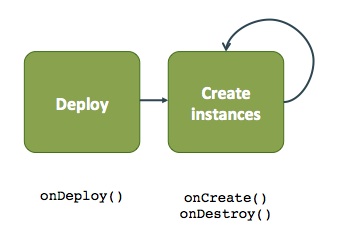
| 事件 | 描述 |
|---|---|
| onDeploy() | 视图部署时调用。 |
| onCreate() | 创建视图实例时调用。 |
| onDestroy() | 销毁视图实例时调用。 |
视图事件
视图可以相互传递事件。获取 ViewController 对象后,可以为视图事件注册监听器,并为其他监听器触发事件。视图可通过视图名称或视图名称 + 版本,借助 ViewController 为其他视图注册 Listener 和 ViewController。源视图触发 Event 后,所有已注册监听器都会收到该事件。
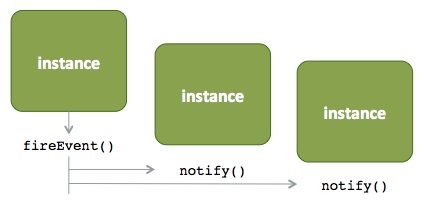
- 获取视图控制器并注册监听器。
viewContext.getViewController().registerListener(...);
-
触发事件。
viewContext.getViewController().fireEvent(...); -
框架将通知所有已注册监听器。监听器实现可以适当处理事件。
listener.notify(...)